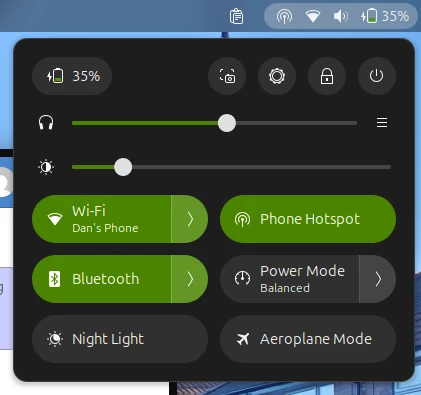
Hotspot Toggle is a GNOME Shell extension that provides a convenient way to enable and disable your Android phone's mobile hotspot directly from your desktop's Quick Settings menu. By leveraging Bluetooth connectivity and NetworkManager integration, the extension automates the process of connecting to your phone's hotspot network.
Overview
The extension works by establishing a Bluetooth connection with your Android device, which triggers the Automate flow on your phone to toggle the hotspot. Once the hotspot is active, the extension automatically connects your machine to the Wi-Fi network using NetworkManager. The entire process is managed through a simple toggle in GNOME Shell's Quick Settings panel.
This project started in August 2025 and has evolved from a JavaScript-based proof-of-concept to a fully-featured TypeScript extension with robust error handling, connection management, and localization support.
Development & Evolution
I created this extension since I was jealous of macOS' ability to toggle an iPhone's personal hotspot from the menu bar. Having to turn my hotspot on from my phone and manually connect to the Wi-Fi network felt clunky and long-winded for a process I do almost daily.
My initial solution was to use an Automate flow on my phone which detects my laptop connecting to it via Bluetooth, which toggles mobile hotspot on and off. Conveniently the Bluetooth tethering toggle in Ubuntu quick settings connects to my phone via Bluetooth, fails to establish a Bluetooth tether (since my phone switches off Bluetooth tethering automatically), then disconnects, after which my laptop eventually connects to the Wi-Fi hotspot automatically.
I thought this was strangely elegant, but janky. I figured other people had the same issue I had, so I created this extension to make the process more deliberate, reliable and snappier, whilst also using the project as a vessel to familiarise myself with Gjs. Overall it was a fun learning experience, and gives me confidence to make more GNOME Extensions in the future.
Future Improvements
At the moment, the extension in its current state works well enough for my use case. However, I may implement more features in the future, those being:
- Additional language translations (entirely dependent on contributors, might add Arabic translations at some point)
- Dedicated app to replace the automate flow on the Android device
- Support for iOS devices
- Automated connection wizard
- Multiple device profiles
- Connection quality monitoring (e.g. signal strength and 4G/5G indicator)
Contributing
Contributions are welcome! The project is open source and available on GitHub using the link at the top of this post. At the moment I'm primarily looking for help with translations at the moment (I refuse to use any form of machine translation like LibreTranslate, at that point most non-native English speakers would understand my English better than whatever translation it would come up with).