To anyone that knows me well, they'd know there's nothing I despise more than Electron apps; at the worst of times it will not run without an internet connection, and at the best of times it's horribly RAM and power inefficient, not ideal for a guy with a laptop that has sub 3 hour battery life and 8GB RAM (in 2025… maybe I'm coping). It's the very reason I immediately dismissed projects like Hyper. So when Microsoft, the creators of .NET, came out with Visual Studio Code built with Electron, I was immediately shocked by its snappiness compared to JetBrains' IDEs and its richness in features compared to Sublime Text.
Ten years later, and VS Code is now Microsoft's specially designed gateway drug to GitHub Copilot, and there's seemingly a new VS Code fork every week, providing new AI features that every other VS Code-based editor then copies. Cursor is a great improvement over VS Code in terms of usability, but requires a subscription to get any use out of its AI features, and other AI-focused VS Code forks like Windsurf and Antigravity suffer from the same problem whilst also being either no better than VS Code, or worse, a buggy mess (looking at you Antigravity). So, as someone with a GitHub Copilot subscription I got for free through my university, I'm seemingly stuck with VS Code for now.
Luckily for me, there's at least one AI company not riding the coattails of VS Code's success.
Enter Zed, the AI-focused code editor
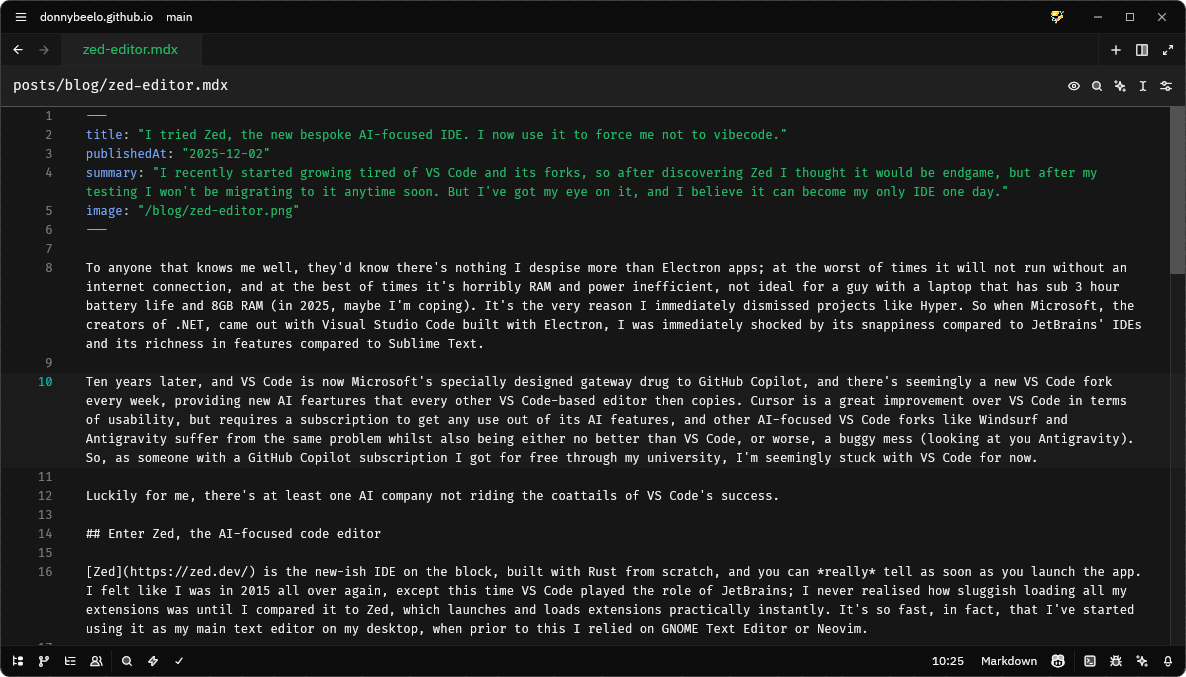
Zed is the new-ish IDE on the block, built with Rust from scratch, and you can really tell as soon as you launch the app. I felt like I was in 2015 all over again, except this time VS Code played the role of JetBrains; I never realised how sluggish loading all my extensions was until I compared it to Zed, which launches and loads extensions practically instantly. It's so fast, in fact, that I've started using it as my main text editor on my desktop, when prior to this I relied on GNOME Text Editor or Neovim.
As a UI hyperfixator, Zed passes with flying colours; it's simple, unbloated, and stays out of your way at times when you just want to code. Its use of space strikes a great balance between function and form Comparing the sidebar buttons of Zed, which sit on the bottom of the window, to VS Code, its two options being a clunky sidebar or an even worse top(/bottom) bar (which comes with the added benefit of vanishing when you collapse the sidebar 👍), Zed wins by a landslide. My only gripe is that the 'Project Panel' icon doesn't make its function very clear, and looks too similar to the 'Outline Panel' icon; this wouldn't be too bad if they were customisable, which they arent.
The ability to customise your keybindings is a must, and Zed delivers here too. It comes with sensible defaults, but you can change anything you want, including chorded keybindings (which I hate, but the option's there if you want it). There's even support for custom tasks, which can be assigned to keybindings or run from the command palette using the task: spawn command; I have a few of these set up, namely one for opening my terminal emulator in the current project's directory (crazy that's not an option in the command palette), and one to open SourceGit, since their Git implementation isn't all there yet. You can find my config files here.
One thing I can't speak much for is Zed's AI features, since I refuse to pay for them. Thankfully, Zed gives you the option to hide all of the Zed AI stuff and replace it with GitHub Copilot, which makes this IDE the only real contender to VS Code I've found for my use case. I wish I could run Zed AI through its paces for interest's sake, but I can't justify paying for another AI coding assistant when I already have one that works well enough for me, and most of all, is free of charge.
I also can't speak for the collaborative features Zed offers, which essentially attempts to replace the need to Slack call a colleague you're working with remotely. From the outset, it looks cool, I like that it's integrated with the IDE. I'm not sure how useful it is in the context of work, since it would only be useful if the whole team uses it, and it can't be monitored outside of the Zed application, rendering it useless for team leads that can't access their laptop, e.g. on their journey to work. This is an area I think Zed tries too hard to differentiate itself from the pack; if it were up to me, forego the voice-chat features and just focus on making the collaboration panel as useful as Live Share, nothing more nothing less. Alas, whatever makes the shareholders happy…
The verdict
After using Zed for the past month, I won't be completely switching to it, at least for the time being. VS Code has a drastically better AI feature set which does a much better job at solving problems I don't want to think about too hard. But for editing text, or for those times I really want to get into the weeds of finding a solution, Zed has found a home in my dock.
It manages to be quick, efficient and beautiful compared to the competition, and with a loyal thriving community, I think that unless it veers massively off track, Zed could become a household name amongst programmers and hobbyists alike. I can't wait for all the improvements the Zed team have lined up for 2026, of which I'm really excited about getting notebook support and native merge conflict resolution. It would be tragic if they lost steam before then, but I don't think they will. Until then, although it's served me well over the past 9 years, I can't wait for the day I can finally get rid of the blue ribbon once and for all.